Subsection4.5.1Accumulator Pattern for Sum/Average
As we have seen before with loops, the accumulator pattern is an algorithm that iterates through a set of values using a loop and updates an accumulator variable with those values, for example to compute a sum or average of a set of values. The accumulator pattern has 4 steps:
With arrays, the accumulator pattern is used to compute the sum or average of the elements in the array. The sum is the total of all the elements in the array, and the average is the sum divided by the number of elements in the array.
int[] values = {6, 2, 1, 7, 12, 5};
double sum = 0;
for (int val : values)
{
    sum += val;
}
double average = sum / values.length;
System.out.println("Average is " + average);
Activity4.5.1.
The following program has the correct code to return the average of the first 3 items in the array a, but the code is mixed up. Drag the blocks from the left into the correct order on the right. You will be told if any of the blocks are in the wrong order or are indented incorrectly.
public static double avg3(int[] a)
{
---
  double total = 0;
---
  for (int i = 0; i < a.length && i < 3; i++)
  {
---
    total = total + a[i];
---
  } // end for
  return total / 3;
---
} // end method
Here is an object-oriented example that has the array as a private instance variable in the class and provides public methods sum and average that use enhanced for loops. You can use the Code Lens button to step through this code.
In the last lesson, you wrote a spell check algorithm which searched for a word in an array of dictionary words. Searching for the minimum or maximum follows a similar pattern of a loop with an if statement inside it. The pattern to follow is an enhanced for loop or an indexed for loop, with an embedded if statement. Remember that enhanced for loops cannot be used to modify primitive values in an array or to return an index.
for (int value : array)
{
    if (value ....)
        ...
}

for(int i=0; i < array.length; i++)
{
   if (array[i] ....)
       ...
}
Activity4.5.3.
The following method has the correct code to return the largest value in an integer array called vals (an instance variable of the current object), but the code is mixed up. Drag the blocks from the left into the correct order on the right and indent them correctly as well. You will be told if any of the blocks are in the wrong order or not indented correctly.
public int getLargest()
{
---
  int largest = vals[0];
---
  for (int item : vals)
  {
---
    if (item > largest)
    {
---
      largest = item;
---
    }  // end if
---
  } // end for
  return largest;
---
} // end method
The code below finds the minimum (smallest element) in an array. Try it in the Java visualizer with the CodeLens button. Can you change it to find the maximum element instead? Can you also compute the average of the elements?
When searching for an element or a minimum or maximum, it is important not to leave the loop early before finding the correct value and not to replace the value with subsequent ones.
Run the following code. Does it find 7 in the array? Click on Code Lens to trace through the code to see why not. Fix the early return error in the following code.
Given that array is an array of integers and target is an integer value, which of the following best describes the conditions under which the following code segment will return false?
public boolean find(int[] array, int target)
{
    for (int val : array)
    {
        if (val == target)
        {
            return true;
        }
        else
        {
            return false;
        }
    }
    return false;
}
Whenever the first element in array is not equal to target.
Yes, the loop returns as soon as checking the first element, whether it is equal to target or not. It needs to check the whole array before returning false. The else statement should not be included.
Whenever array contains any element which equals target.
This would be true if the else statement was not there, but it returns false right away after just checking the first element instead of going through all of the elements to makes sure none of them are equal to target.
Always
If the first element is equal to the target, it will return true.
Never
It will return false with the else statement if the first element is not equal to the target.
Given that array is an array of integers and target is an integer value, which of the following best describes the conditions under which the following code segment will return true?
boolean temp = false;
for (int val : array)
{
  temp = ( target == val );
}
return temp;
Whenever the first element in array is equal to target.
This would be true if the loop started at the end of the array and moved toward the beginning. But, it will loop from the first element to the last.
Whenever array contains any element which equals target.
This would be true if temp was only set to the result of checking if the current element in the array is equal to target when it is false. But, it is reset each time through the loop.
Whenever the last element in array is equal to target.
The variable temp is assigned to the result of checking if the current element in the array is equal to target. The last time through the loop it will check if the last element is equal to val.
Whenever only 1 element in array is equal to target.
There is no count of the number of times the array element is equal to target.
You don’t have to loop through an array from the front to the back. You can loop by starting at the back of the array and move toward the front during each time through the loop. In the example below, the method getIndexOfLastElementSmallerThanTarget returns the index of the last element in the array that is smaller than the given argument. The return statement inside the loop stops the execution of the loop and the method and returns the index that is found immediately back to the main method. It returns -1 if there is no number in the array that is smaller than the given number.
What does the following code print out? Notice that the array and the target are passed in as arguments to the getIndexOfLastElementSmallerThanTarget method. Trace through it keeping track of the array values and the output. Then run it to see if you’re right. You can also try the code in the Java visualizer with the Code Lens button. Can you add another method that finds the index of the last element greater than the target instead of smaller than the target and have main print out a test of it? Call this method getIndexOfLastElementGreaterThanTarget and give it 2 arguments and a return value like the method below.
Given the following code segment (which is identical to the method above) what will be returned when you execute: getIndexOfLastElementSmallerThanTarget(values,-13);
private int[ ] values = {-20, -15, 2, 8, 16, 33};

public static int getIndexOfLastElementSmallerThanTarget(int[ ] values, int compare)
{
   for (int i = values.length - 1; i >=0; i--)
   {
      if (values[i] < compare)
         return i;
   }
   return -1; // to show none found
}
-1
The method will only return -1 if no value in the array is less than the passed value.
-15
The method returns the index of the first item in the array that is less than the value, not the value.
1
Since the method loops from the back towards the front -15 is the last value in the array that is less than -13 and it is at index 1.
You will get an out of bounds error.
No, the method correctly starts the index at values.length - 1 and continues as long as i is greater than or equal to 0.
Given the following code segment (which is not quite identical to the method above) what will be returned when you execute: getIndexOfLastElementSmallerThanTarget(values, 7);
int[ ] values = {-20, -15, 2, 8, 16, 33};

public static int getIndexOfLastElementSmallerThanTarget(int[] values, int compare)
{
   for (int i = values.length; i >=0; i--)
   {
      if (values[i] < compare)
         return i;
   }
   return -1; // to show none found
}
-1
The method will only return -1 if no value in the array is less than the passed value.
1
Check the starting index. Is it correct?
2
Check the starting index. Is it correct?
You will get an out of bounds error.
You can not start the index at the length of the array. You must start at the length of the array minus one. This is a common mistake.
Often we loop through an array to see if elements have a particular property, for example all the elements are even or at least one is negative. On the AP exam, this property is often given as a boolean method to use in the if statement to:
Here are some patterns. Note that determining if all have a certain property means that we need to check all elements before returning true, so we often have to check for the negation of the property to return false.
// see if at least one has the property
for (int val : values)
{
    if (isProperty(val))
    {
        return true;
    }
}
return false;

// see if all have the property
for (int val : values)
{
    if (!isProperty(val))
    {
        return false;
    }
}
return true;

// count the number of elements with the property
int count = 0;
for (int val : values)
{
    if (isProperty(val))
    {
        count++;
    }
}
Activity4.5.11.
The following program segment should count the number of elements in the array that are even using an enhanced for each loop. But, the blocks have been mixed up. Drag the blocks from the left and put them in the correct order on the right. Click the Check button to check your solution.
Write the method allOdd to return true if all the values in the array are odd. First write the helper function isEven to return true or false for one value, using %.
Here is a pattern to check for duplicates in an array by accessing a pair of elements next to each other, array[i] and array[i+1]. Note that we need to use an indexed for loop to get access to the next element.
// check for duplicates next to each other
for (int i = 0; i < values.length - 1; i++)
{
    if (values[i] == values[i + 1])
    {
        return true;
    }
}
return false;
If we want to check for duplicates anywhere in the array, we need to use a nested loop to compare all pairs of elements in the array.
// check for duplicates anywhere in the array
for (int i = 0; i < values.length; i++)
{
    for (int j = i + 1; j < values.length; j++)
    {
        if (values[i] == values[j])
        {
            return true;
        }
    }
}
return false;
Activity4.5.13.
Create a method sumPairs10(nums) returns true if there are at least two items in the array nums that are adjacent (next to each other) that add up to 10, otherwise return false.
Create a method noDups(nums) returns true if there are no repeated (duplicate) items in the array nums. It should return false if it does find a repeated element using nested loops.
Rotating an array means shifting all the elements in the array to the right or left by one position. For example, if the array is {6, 2, 5, 3}, rotating it to the right would give {3, 6, 2, 5}. To rotate an array, we need to copy the last element to the first position and then copy all the other elements to the next position. We can use a temporary variable to store the last element before overwriting it. If you do not want to change the original array, you can return a new array by copying in the rotated elements.
The following program segment is a method that should return an integer array that is rotated to the right – so {6, 2, 5, 3} returns {3, 6, 2, 5} (the parameter). Note that the method return type is int[] which means it will return an int array. But, the blocks have been mixed up and include one extra block that is not needed in a correct solution. Drag the blocks from the left and put them in the correct order on the right. Click the Check button to check your solution.
We can also rotate in place without constructing another array. We can copy the last element to the first position and then copy all the other elements to the next position. We need to use an indexed loop to access the elements at different indices. When you pass an array to a method, you’re actually passing a reference to the array’s memory location. This means that any changes made to the array within the method will affect the original array.
The code below rotates array elements to the left in place without constructing another array. Try it in the Java visualizer with the CodeLens button. Can you change it to rotate the elements to the right instead? Hint: use a backwards loop.
Reversing an array is similar to rotating it. We can copy the first element to the last position, the second element to the second-to-last position, and so on. We can use a temporary variable to store the value of the element we are overwriting. We usually need an indexed loop to access the elements at different indices unless we use a temporary array to store the reversed elements. Note that arrays are passed as references to methods, so any changes made to the array within the method will affect the original array.
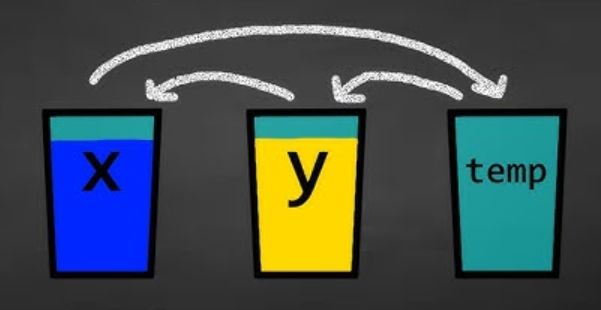
The following programs show how you can reverse an array in place by swapping elements. The first uses a while loop and the second an indexed for loop. To swap two elements, you need to use a temp variable to store the value of the element you are overwriting. Imagine that you have a glass of milk and a glass of orange juice. How would you swap the contents of the two glasses without making a huge mess? You would need a third glass to hold the contents of one of the glasses while you pour the contents of the other glass into it. Then you can pour the contents of the third glass into the other glass. This is the same idea behind swapping elements in an array.
// Swapping 2 elements at index i and j
int temp = array[i];  // pour milk into temp cup
array[i] = array[j];  // pour orange juice into milk glass
array[j] = temp;      // pour milk from temp into oj glass
Activity4.5.17.
The following method reverses an array in place using an indexed for loop and a temp variable to swap the first and last items, but the code blocks are mixed up. Drag the blocks from the left and put them in the correct order on the right. Click the Check button to check your solution.
public static void reverse(int[] a)
{
---
  int temp = 0;
  int half = a.length / 2;
  int max = a.length - 1;
---
  for (int i = 0; i < half; i++)
  {
---
     temp = a[i];
---
     a[i] = a[max - i];
---
     a[max - i] = temp;
---
  } // end for
---
} // end method
The following method reverses an array in place using a while loop and a temp variable to swap the first and last items. But, the blocks have been mixed up and include two extra blocks that are not needed in a correct solution. Drag the blocks from the left and put them in the correct order on the right. Click the Check button to check your solution.
This lesson ends the section on 1-dimensional arrays. You can now do the following review lessons and FRQs at the end of the unit and College Board Progress Check for Unit 4 Part A in the AP Classroom.
We encourage you to work in pairs or groups to tackle the following challenging FRQ problems and take them one step at a time. These will get easier with practice! Note that the third FRQ now uses ArrayLists instead of arrays, but these FRQ practice probelms will still help you to practice iterating over a data structure and can be converted to work with ArrayLists.