Activity 3.3.1.
The following Person class keeps track of the name, email, and phone number of a person. Try changing the Person p2 object in the main method to your name. Click on the Show CodeLens button and then Next to step through the code.

yertle and myrtle, 2 Turtle variables and assigned them references to objects created from the class Turtle and we used instances of Java’s String class to assign values to different String variables.
public before them though it is not required. The class definition itself always starts with the word class followed by the name of the class. Then the rest of the class, called the body, is defined inside a pair of {}s.
Person. Classes are almost always named with capitalized names though this is a matter of style, not a rule of the language. In this course, classes are always designated public and are declared with the keyword class. Here is the basic skeleton of a Person class:
public class Person
{
    // define class here - also called the “body” of the class

}
Person class with new as in new Person() And you can declare variables that can hold a reference to a Person object with Person variableName. Or put it altogether to declare some variables and initialize each one with a reference to a new Person as shown here.
Person ada = new Person();
Person charles = new Person();
{}s?
yertle and myrtle from to be at different positions at the same time; they each had their own x position and y position instance variables.
public.
Turtle methods that moved the turtle on the screen) or return values like the getXPos and getYPos on Turtle. The methods of the class share access to the object’s instance variables and when a method is called on an object it uses the instance variables for that object. For example in the Turtle class the forward method changes an instance variable xPos. When you call forward on yertle it changes xPos on the yertle object and when you call it on myrtle it changes the xPos on the myrtle object.
public class Person
{
    // instance variables

    // constructors

    // methods

}
main method which can be used to run that class as a program either to test that one class or sometimes as the entry point to a whole program made up of many classes and objects.
Person.
Person class with instance variables, a constructor, and methods. We’ll go through the details in the next few sections but for now you can run the code to see how it constructs 2 Person objects and fills in their data. Remember that execution always starts in the main method. When a method like print is called, the code defined in the method runs but when it gets the values of name, email, and phoneNumber it gets the specific values of those variables that were set by the constructor when the particular object we called print on was created. Click on the Show CodeLens button below and the Next button to run the code step by step.
public and private are called access modifiers, and they affect how you can the access classes, data, constructors, and methods. The keyword public means anyone can access this; it allows access from classes outside the declaring class. The keyword private restricts access to the declaring class which means that variables or methods marked private are only accessible inside the class where they are defined. In general, instance variables in a class should be declared private to ensure data encapsulation.
private as like your diary. Only you should have direct access to it. Similarly, in Java a private instance variable can only be accessed by code inside the class that declares the variable.
private then the type of the variable and then a name for the variable. Private means only the code in this class has access to it.
Person class declares 3 private instance variables: name, email, and phoneNumber. These are things that you might want to know about a person. They are declared at the top of the class and they exist inside the { } of the class.
Person, we can create many instances (objects) of the class. The class is like a blueprint or cookie cutter that defines the variables and methods for that class. Each object will have their own copies of the same instance variables but with possibly different values in them (as seen in the cookie decorations below).
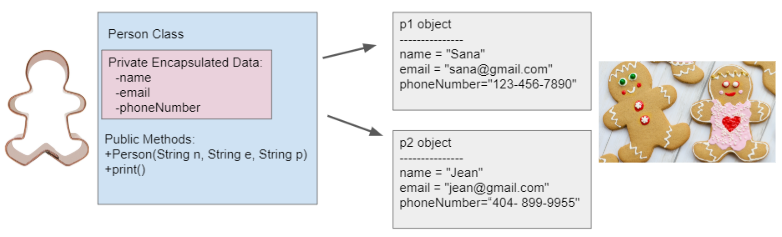
private in order to ensure data encapsulation where the data (instance variables) and the code acting on the data (methods) are wrapped together into a single unit and the implementation details are hidden. Only code in the class can access or change the values of private instance variables. This keeps the data secure and makes it a lot easier to keep track of how your program works than if you had to worry that any code anywhere in a much larger program could possibly change the values of the variables.
public methods you provide and cannot directly access the private instance variables (shown in the pink box above). When designing a class you get to decide what data to make accessible or modifiable from other classes by what public methods you provide.
Math.random() which were called with the classname. Instance methods are not marked static and are always called using an object of the class and can access the object’s instance variables.
public so they can be accessed from inside or outside the class. Methods designated as private are not accessible outside of the class; they can only be used as helper methods by other methods inside the same class.
public then a type, then the name of the method followed by parentheses for optional parameters. Methods defined for an object can access and use its instance variables!
Person class above has a print method that prints out all the data stored for a person object. Notice that it is marked as public and after public comes the return type. The void return type is used to indicate that the method does not return anything but has some effect such as printing to the screen. After the return type comes the method name followed by parentheses containing the list of parameters. In this case there are no parameters but we still need the ()s. The body of the method is in {}s. As we’ve discussed, the method can access and use the instance variables defined in the class: name, email, and phoneNumber but will get the values specific to the object we called print on.
public void print()
{
  System.out.println("Name: " + name);
  System.out.println("Email: " + email);
  System.out.println("Phone Number: " + phoneNumber);
}
.) operator to call its public methods, for example p1.print() means call the print method on the object p1.
// call the constructor to create a new person
Person p1 = new Person("Sana", "[email protected]", "123-456-7890");
// call p1's print method
p1.print();

Person class above as a guide, write a VirtualPet class in the Active Code template below with the following parts.
VirtualPet class below. Two of the instance variables should be called name and health where health is a number from 0 to 10. The rest can be variables from your design above. Don’t forget to add in their private access modifiers.
print method to print out the instance variables of the VirtualPet object, and complete the feed method to add 1 to the health instance variable. Remember that the methods have direct access to the instance variables. Create at least one more method that changes one of the instance variables from your design. (The constructor method and a get method is written for you below. You will learn how to write constructors in detail in the next lesson.)
main method to construct at least 2 VirtualPet objects that call the VirtualPet constructor given to you with arguments for name and health. Then, use at least one of the objects to call its feed and print methods.
public and private affect the access of classes, data, constructors, and methods. The keyword private restricts access to the declaring class, while the keyword public allows access from classes outside the declaring class.
public and are declared with the keyword class.
public.
private unless the class specification states otherwise.
public class Cat
{
    /* missing code */
}
public String name;
public int age;
private Cat(String name, int age)
{ /* implementation not shown */ }
public String name;
private int age;
private Cat(String name, int age)
{ /* implementation not shown */ }
private String name;
private int age;
public Cat(String name, int age)
{ /* implementation not shown */ }
public String name;
public int age;
public Cat(String name, int age)
{ /* implementation not shown */ }
private String name;
private int age;
private Cat(String name, int age)
{ /* implementation not shown */ }
public class Party
{
    /* missing code */
}
private int numOfPeople;
private int volumeOfMusic;
private int numOfBoxesOfPizza;
public Party()
{ /* implementation not shown */ }
private void startParty()
{ /* implementation not shown */ }
private int numOfPeople;
private int volumeOfMusic;
private int numOfBoxesOfPizza;
public Party()
{ /* implementation not shown */ }
public void startParty()
{ /* implementation not shown */ }
public int numOfPeople;
public int volumeOfMusic;
public int numOfBoxesOfPizza;
public Party()
{ /* implementation not shown */ }
public void startParty()
{ /* implementation not shown */ }
private int numOfPeople;
private int volumeOfMusic;
private int numOfBoxesOfPizza;
private Party()
{ /* implementation not shown */ }
private void startParty()
{ /* implementation not shown */ }

