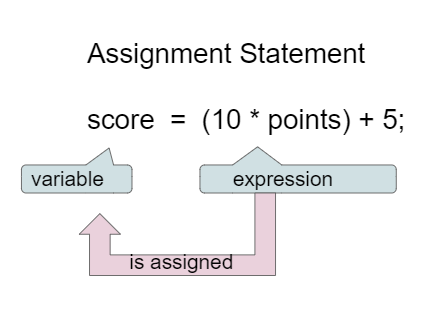
Assignment statements initialize or change the value stored in a variable using the assignment operator =. An assignment statement always has a single variable on the left hand side. The value of the expression (which can contain math operators and other variables) on the right of the = sign is assigned to and stored in the variable on the left side.
Instead of saying equals for the = in an assignment statement, say “gets” or “is assigned” to remember that the variable gets or is assigned the value on the right. In the figure above score is assigned the value of the expression 10 times points (which is another variable) plus 5.
As we saw in the video, we can set one variable’s value to a copy of the value of another variable like y = x;. This won’t change the value of the variable that you are copying from.
Let’s step through the following code in the Java visualizer to see the values in memory (click here if the code below does not generate). Click on the Next button at the bottom of the code to see how the values of the variables change. You can run the visualizer on any Active Code in this e-book by just clicking on the Code Lens button at the top of each Active Code.
int x = 0;
int y = 1;
int z = 2;
x = y;
y = y * 2;
z = 3;
x = 0, y = 1, z = 2
These are the initial values in the variable, but the values are changed.
x = 1, y = 2, z = 3
x changes to y’s initial value, y’s value is doubled, and z is set to 3
x = 2, y = 2, z = 3
Remember that the equal sign doesn’t mean that the two sides are equal. It sets the value for the variable on the left to the value from evaluating the right side.
x = 0, y = 0, z = 3
Remember that the equal sign doesn’t mean that the two sides are equal. It sets the value for the variable on the left to the value from evaluating the right side.
The following has the correct code to ‘swap’ the values in x and y (so that x ends up with y’s initial value and y ends up with x’s initial value), but the code is mixed up and contains one extra block which is not needed in a correct solution. Drag the needed blocks from the left into the correct order on the right. Check your solution by clicking on the Check button. You will be told if any of the blocks are in the wrong order or if you need to remove one or more blocks. After three incorrect attempts you will be able to use the Help Me button to make the problem easier.
Every variable must be assigned a value before it can be used in an expression. That value must be from a compatible data type. A variable is initialized the first time it is assigned a value. During execution, an expression is evaluated to produce a single value. The value of an expression has a type based on the types of the values and operators evaluated in the expression. For example, an arithmetic expression that uses at least one double value will evaluate to a double value and must be saved in a double variable, as seen in the exercise below. In the next lesson, we will see how to change a variable or expression from one type to another.
The code below looks okay at first glance, but if you run it, you will see that there is an error of incompatible types. Change the data type of one of the variables to fix the error.
Reference types like String can be assigned a new object or null if there is no object. The literal null is a special value used to indicate that a reference is not associated with any object.
If you use a variable to keep score, you would probably increment it (add one to the current value) whenever score should go up. You can do this by setting the variable to the current value of the variable plus one (score = score + 1) as shown below. The formula would look strange in math class, but it makes sense in coding because it is assigning a new value to the variable on the left that comes from evaluating the arithmetic expression on the right. So, the score variable is set to the previous value of score plus 1.
Variables are a powerful abstraction in programming because the same algorithm can be used with different input values saved in variables. Input can come in a variety of forms, such as tactile for example by clicking on a button, audio with speech, visual using a webcam, or the most common form, text that the user types in. The Scanner class in Java is one way to obtain text input from the keyboard.
The code below using the Scanner class will say hello to anyone who types in their name and will have different results for different name values. First, type in your name below the code and then click on run. Try again with a friend’s name. The code works for any name: behold, the power of variables!
Although you will not be tested in the AP CSA exam on using the Java input from the keyboard, learning how to do input in Java is very useful and fun. For more information on using the Scanner class, go to https://www.w3schools.com/java/java_user_input.asp, and for the newer Console class, https://howtodoinjava.com/java-examples/console-input- output/. We are limited with the one way communication with the Java server in this Runestone ebook, but in most IDEs, the input/output would be more interactive. You can try this JuiceMind IDE (click on Create Starter Code after login with a Google account) or Scanner input example in Replit using the Scanner class and Console input example using the Console class. We will also learn how to use Scanner with input files in a later unit.
In this coding challenge, you will calculate your age, and your pet’s age from your birthdates, and your pet’s age in dog years. In the code below, type in the current year, the year you were born, the year your dog or cat was born (if you don’t have one, make one up!) in the variables below. Then write formulas in assignment statements to calculate how old you are, how old your dog or cat is, and how old they are in dog years which is 7 times a human year. Finally, print it all out. If you are pair programming, switch drivers (who has control of the keyboard in pair programming) after every line of code.
Your teacher may suggest that you use a Java IDE with interactive input using the Scanner class for this challenge, for example this JuiceMind IDE or repl template if you want to try the challenge with input.
(AP 1.4.A.2) The assignment operator (=) allows a program to initialize or change the value stored in a variable. The value of the expression on the right is stored in the variable on the left.
(AP 1.4.A.1) Reference types can be assigned a new object or null if there is no object. The literal null is a special value used to indicate that a reference is not associated with any object.
(AP 1.4.A.3) During execution, an expression is evaluated to produce a single value. The value of an expression has a type based on the types of the values and operators used in the expression.
(AP 1.4.B.1) Input can come in a variety of forms, such as tactile, audio, visual, or text. The Scanner class is one way to obtain text input from the keyboard, although input from the keyboard will not be on the AP exam.
Don’t forget that the result will be a double since at least 1 double value is involved.
8.0
Yes, this is equivalent to (5 + ((a/b)*c) - 1) using int division.
10.5
Don’t forget that division and multiplication will be done first due to operator precedence, and that an int/int gives an int truncated result where everything to the right of the decimal point is dropped.
An incompatible type error will occur.
No error will occur since the double result is saved in a double.
Subsection1.4.8AP Classroom Progress Check Unit 1 Part A
This lesson ends the section for the College Board Unit 1 part A. You can now do the College Board Progress Check A for Unit 1 in the AP Classroom. Or you can choose to wait until after lesson 1.6 where you will find links to the end of unit practice and review which will help you to prepare for the progress check.